Your agent asks permission
before anything moves.
Retries, loops, and parallel agents can silently overspend before your logs notice. FiGuard is runtime authorization for agents. It checks limits and reserves capacity before anything executes, across money, tokens, API calls, any bounded resource.
No signup, no Docker — runs the exact scenario shown above.
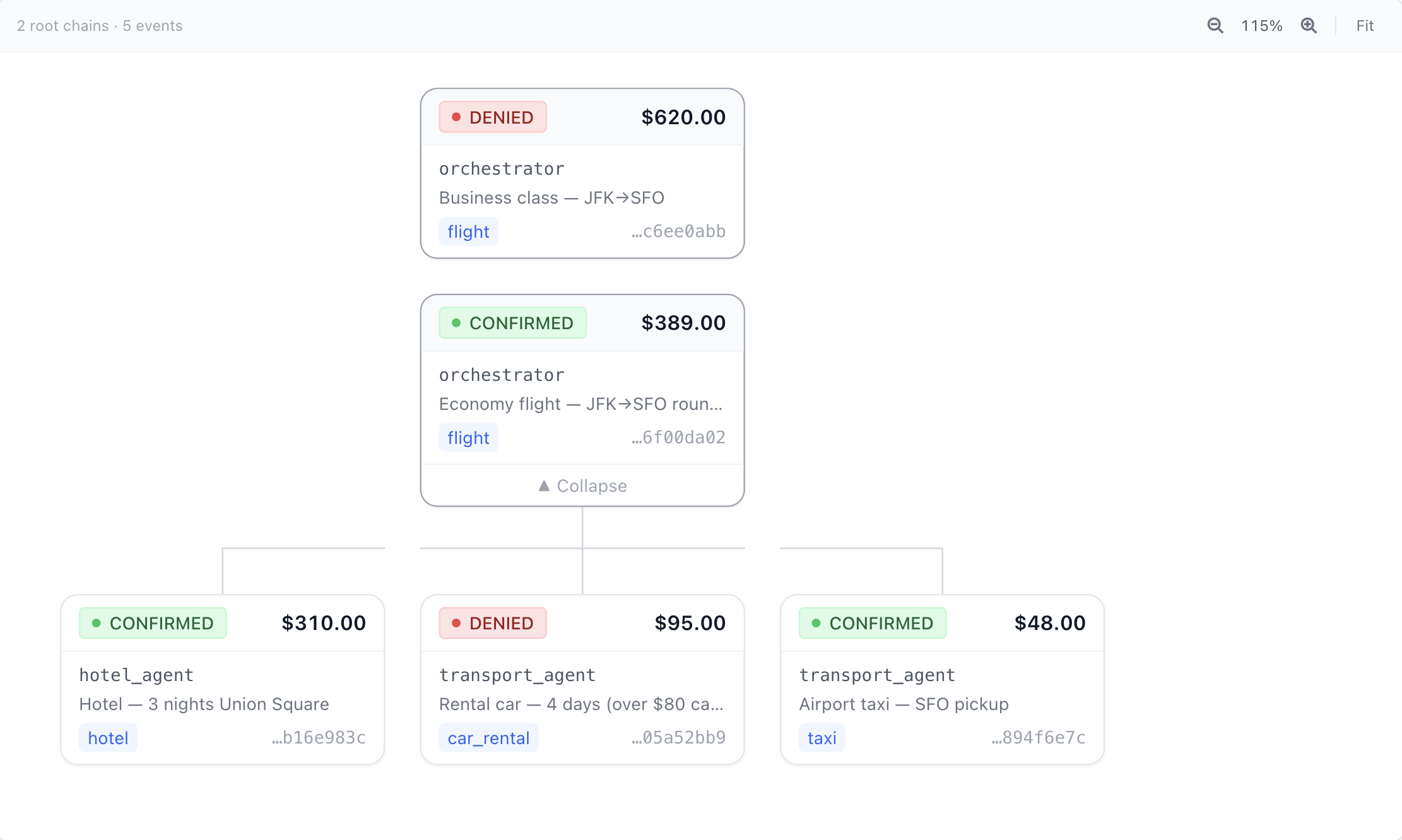
Spend tree — every authorization decision, every agent, every level of delegation.
That's not a guardrail. That's a receipt.
Agents don't ask permission. They decide and execute — and your logs tell you what happened after the money moved.
Without FiGuard
# Agent decides to act — nothing checks first

result = vendor_api.create_order(
    amount=1890.00,
    vendor="acme-supplies",
    category="office_supplies",
)

# Executed.
# No budget check. No category enforcement.
# No audit record. Fleet has no idea.
With FiGuard
budget = client.create_budget(
    total_limit=1000.00, currency="USD",
    allocations={"office_supplies": 800.00},
)

auth = client.authorize(
    session_token=budget.primary_token.session_token,
    agent_id="procurement_agent",
    action_type="PURCHASE",
    description="Acme office supplies order",
    requested_quantity=1890.00,
    claimed_category="office_supplies",
    idempotency_key="order-2026-001",
)

if auth.is_authorized:
    result = vendor_api.create_order(
        amount=auth.approved_quantity,
    )
    client.confirm_event(
        auth.event_id,
        confirmed_quantity=1890.00,
    )

# DENIED — ALLOCATION_EXHAUSTED
# office_supplies: $800 / $800 consumed
#
# Nothing moved.
# Logged in ledger.
# Agent receives reason code.
# Fleet sees the updated balance.
FiGuard sits in your code, not between your agent and the API. Add it wherever your agent takes actions that consume resources.
Works the same for payments, LLM tokens, API quotas, GPU hours, or any bounded resource.
Every agent decision. Authorized, logged, and explainable.
Three agents share one budget. Every request is pre-authorized before it executes — approved or denied, with full parent–child lineage and delegation logged in real time. Simulation
▶ Run in Colab →Where FiGuard fits
Your framework decides what to do next. FiGuard decides whether the resource-consuming action is allowed.
LangChain / LangGraph
FiGuard authorizes each tool call before it executes. A budget-exhausted agent stops cleanly instead of running up cost — even across parallel nodes in a LangGraph.
CrewAI
Each crew member gets a delegation token with its own cap. A runaway specialist is stopped at its limit without affecting the rest of the crew.
OpenAI Agents SDK / MCP
Wrap tools with @guarded_function_tool or add the FiGuard MCP server — every tool call is pre-flight authorized before it reaches the API.
Not using a framework?
The raw SDK works anywhere — a Python script, a background job, a serverless function. If it calls an API that costs money or consumes a bounded resource, FiGuard fits.
Why not build it yourself?
The authorize endpoint looks simple — check the balance, write a record. The parts that matter are the parts that aren't obvious until you've hit them in production. FiGuard is financial-grade authorization infrastructure: the same primitives payment teams spent years getting right, applied to agent systems.
Concurrent authorization
Two agents sharing a budget can both read the same available balance, both see enough funds, and both get approved. By the time the second write lands, you're over limit. The fix is a pessimistic write lock on the budget row during authorization — easy to know, easy to forget.
Dangling reservations
A network timeout between the authorization write and the HTTP response leaves the agent with no event ID and the budget with a reserved amount it can't release. You need idempotency keyed to the request, not the response, so a retry finds the original event instead of creating a second one.
The reservation / confirmation split
If you deduct at authorization time, two concurrent authorizations both read the same balance before either writes. The correct model is two fields: amountReserved and amountSpent. It's the same reserve-then-capture pattern payment processors use — it's just usually hidden inside Stripe.
Session token security
You need a token that scopes to exactly one budget, is returned exactly once, and is never stored in plaintext. Hash at write time, never store the raw value. If your database is breached, every active agent session should not be compromised.
Get started
Runs locally by default: FiGuardClient()
enforces in-process against a local SQLite file — no server, no signup. To try the
shared hosted demo instead, pass mode="sandbox"
(no SLA, data wiped periodically).
Run a server for shared multi-agent budgets.
$pip install figuard from figuard import FiGuardClient
# Zero-config, zero-infra — runs locally (embedded SQLite, no server).
# Share one budget across agents by pointing at a server:
# FiGuardClient(api_key="fg_live_...", base_url="https://figuard.mycompany.internal")
client = FiGuardClient()
budget = client.create_budget(
user_id="agent_001",
total_limit=500.00,
currency="USD",
intent_context="travel booking session",
# velocity_max_per_minute=10, # optional: stop runaway retry loops
)
auth = client.authorize(budget=budget, amount=267.00)
print(auth.decision) # AUTHORIZED
print(auth.approved_quantity) # 267.0
client.confirm(auth, 267.00) # finalize the actual spendUsing a framework? LangChain · CrewAI · OpenAI Agents → · Need fleets, allocations, or anomaly controls? Code wizard →
Common questions
Is FiGuard a proxy or a library? +
A library. FiGuard sits in your code — you call authorize() before an action, confirm() after. There's no network proxy between your agent and the API it's calling. You self-host the FiGuard server alongside your own infra; your spend data never leaves your environment.
Does every agent call have to go through FiGuard? +
Only the calls that consume bounded resources — payments, token-heavy LLM calls, API quotas, GPU hours. Cheap or free operations don't need guarding. You decide the boundary.
How do I run it — hosted, self-hosted, or local? +
Three ways, same API and rules. Embedded: `pip install figuard` / `npm install figuard` enforces in-process against a local SQLite file — zero infrastructure, ideal for a single app or agent. Self-hosted server: one Docker container + one Postgres, for budgets shared across many agents/processes — your spend data stays in your own infra. And a shared sandbox at figuard-sandbox-g1ha.onrender.com for quick evaluation (no uptime SLA).
How does FiGuard relate to Langfuse, LangSmith, or Portkey? +
Observability tools (Langfuse, LangSmith) record what happened after it happened. LLM gateways (Portkey, LiteLLM) manage model routing and token spend on LLM calls. FiGuard authorizes before any action executes and covers the full resource spectrum — payments, tokens, API calls, GPU hours, or any unit you define. They complement each other; FiGuard is the enforcement layer, observability tools are the audit layer.
How does FiGuard handle LLM token budgets? +
LLM gateways count tokens after the response arrives — they can tell you what you spent, but they can't block a call that would exceed a shared budget before it starts. FiGuard uses a reserve-then-confirm model: your agent estimates the cost, calls authorize(estimated_tokens), the budget is reserved, the LLM call runs, then confirm(actual_tokens) settles the real amount. Because the reservation happens before the call, two agents sharing a budget can't both read the same available balance and both proceed — the second one is denied. The contract is: you estimate, FiGuard enforces. Input tokens are countable upfront with tiktoken or Anthropic's count_tokens endpoint; for output tokens you provide a reasonable cap. If no estimate is provided, there's nothing to reserve and no concurrent protection.
Does FiGuard hold funds or process payments? +
No. FiGuard never touches money. It enforces authorization intent before execution — your actual transactions stay inside your existing processors (Stripe, Adyen, or whatever you use). FiGuard decides whether an action is allowed; your payment processor executes it. They are separate concerns.
What is the latency overhead? +
Under 10ms p99 on a local deployment against Postgres with a warm connection pool. The authorize() call acquires a pessimistic row lock, writes the reservation, and returns — there is no external network hop. In practice the overhead is smaller than a typical database query in your existing stack.
How are session tokens protected? +
Session tokens are hashed at write time using SHA-256 and never stored in plaintext. The raw value is returned exactly once — on creation — and is never written to the ledger or logs. If your database is breached, active session tokens are not recoverable from it.